
Multiple authorities, one operation
FAA, TSA, EPA, OSHA, state agencies and local authorities may each publish materials that affect airport operations.
Track the FAA, TSA, environmental, workplace safety, accessibility, cybersecurity and jurisdictional sources your organization selects. When something changes, Rixena helps teams see the source, important dates, affected topics and areas that may require review.
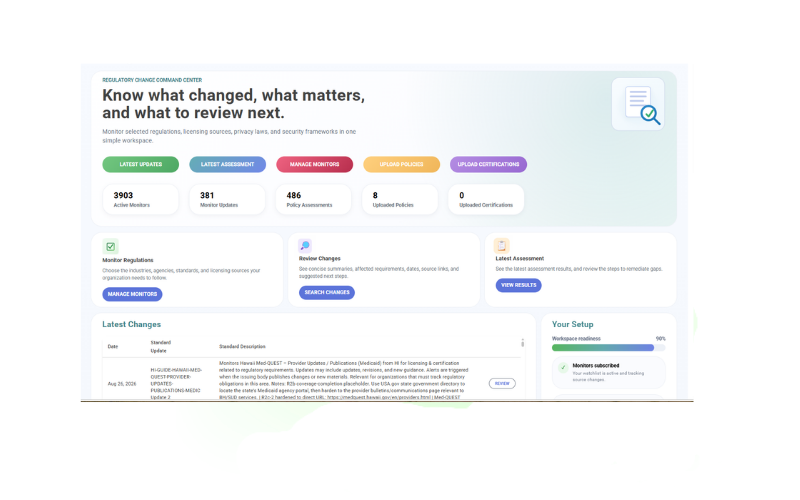
Requirements and guidance are distributed across federal agencies, state and local authorities, grant programs, permits, security programs and technical materials. Rixena brings the sources you select into a consistent monitoring and review process.
FAA, TSA, EPA, OSHA, state agencies and local authorities may each publish materials that affect airport operations.
A change may require review of certification manuals, security programs, emergency plans, environmental procedures or training materials.
Airport class, service profile, ownership, location, grants and operating activities can shape which sources deserve attention.
Rules, CertAlerts, advisory circulars, security materials, permit notices and agency guidance do not follow one publication pattern.
Select the requirements, agencies, jurisdictions and operational topics that matter to each airport or business unit. Available coverage depends on the monitors and sources selected.
Selected 14 CFR Part 139 materials, Airport Certification Manual topics, CertAlerts, advisory circulars, runway safety, ARFF, wildlife, fueling and airport safety management system sources.
Selected 49 CFR Part 1542 materials, Airport Security Program topics, public security directives, amendments, guidance and related transportation security sources available to your organization.
Selected Airport Improvement Program materials, grant assurances, passenger facility charge guidance, airport planning, design and development notices.
Selected EPA and state sources covering industrial stormwater, NPDES permits, deicing effluent, spill prevention, air quality, waste and airport environmental operations.
Selected DOJ, DOT and FAA accessibility, nondiscrimination and public-facility guidance relevant to airport services, terminals and passenger access.
Selected OSHA and state-plan materials, emergency preparedness sources, and NIST, CISA, TSA or FAA cybersecurity guidance relevant to airport operations.
Monitor availability and applicability vary by source, jurisdiction and organization. Your team chooses the watchlist it wants Rixena to follow.
Select your monitors, receive organized change intelligence and optionally connect policies for gap assessment.
Choose the FAA, TSA, environmental, workplace safety, accessibility, cybersecurity and jurisdictional sources relevant to each airport.
See what changed, important dates, affected requirements, source links and suggested review areas.
Upload and assign privacy, security, clinical or operational policies to the monitors they support.
Review potential policy gaps, remediation guidance, ownership and evidence in a consistent workflow.
Rixena follows the rule, bulletin, manual, guidance or licensing source your team selects.
The update is captured, summarized and organized so reviewers can focus on what changed.
Your team receives a focused review package instead of another unstructured alert.
Rixena can support organizations with different airport classes, ownership models, operating profiles and jurisdictional requirements—without forcing every location into the same watchlist.
Create your free monitoring accountReduce repeated searches across individual agency, airport program and permitting websites.
Give owners the source, dates, affected topics and review context in one place.
Connect selected requirements with certification, security, environmental and operational documents.
Keep updates, assessments, ownership, review activity and supporting evidence organized.
Start with regulatory monitoring, then add policy assessment workflows when your team is ready.
Talk to AllgressOrganizations can select from available FAA, TSA, EPA, OSHA, DOT, DOJ, state, local and standards sources relevant to airport safety, security, environmental operations, accessibility, grants, emergency planning and cybersecurity. Available coverage depends on the selected monitors and sources.
Yes. Watchlists can be organized around each airport’s class, ownership, operating profile, jurisdiction, grant obligations and selected sources.
Yes. Regulatory monitoring and change summaries can be used without policy uploads. Uploading and assigning manuals, plans or policies is optional and supports policy assessment workflows.
Your team can assign uploaded manuals, plans, procedures or policies to selected monitors. When a source changes, Rixena can identify areas in those documents that may require review, clarification or remediation.
No. Your organization chooses the sources to monitor and remains responsible for determining applicability. Rixena provides regulatory intelligence and workflow support and does not provide legal advice.
Get a free Rixena account and begin building your organization’s selected monitoring watchlist.